


Softube - Обсуждаем новые релизы, баги и прочее.
- Автор темы SoNick
- Дата начала
Вы используете устаревший браузер. Этот и другие сайты могут отображаться в нём некорректно.
Вам необходимо обновить браузер или попробовать использовать другой.
Вам необходимо обновить браузер или попробовать использовать другой.
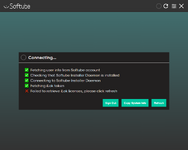

А при каких обстоятельствах такое окно всплывает собсно ? Просто чёт непойму, что за даймоны, токены.Парни, что подправить в консерватории (кроме предложенного рефреша)?
Ничего не менял.
Посмотреть вложение 273520


постоянно встплывало последние месяцы-но все чекалось и открывался манагерА при каких обстоятельствах такое окно всплывает собсно ? Просто чёт непойму, что за даймоны, токены.
Аналогично.вручную инсталю
Но тут решил проверить...

До сих пор они не научили свои плагины по-человечески работать с опенгл. Ставишь галочку и начинаются подвисания, фризы, дёрганный фейс. Рукожопы..
Они где-нить выкладывают новые пресеты для своих плагинов? К примеру, eden 800 что шесть лет назад версия, что последняя - обе с одним и тем же куцым набором пресетиков, неужели за столько лет они не сделали новых?
Они где-нить выкладывают новые пресеты для своих плагинов? К примеру, eden 800 что шесть лет назад версия, что последняя - обе с одним и тем же куцым набором пресетиков, неужели за столько лет они не сделали новых?
Не-а.новые пресеты
Возможно, где-нибудь по форумам есть, но это долго и без гарантии найти.
Парни, подсобите скачать, пожалуйста:

Softube Weiss DS5 Multiband Compressor
https://www.softube.com/plug-ins/weiss-ds5-multiband-compressor
Our Weiss DS5 Multiband Compressor is the highly requested evolution of the industry’s top mastering processor: the award-winning Weiss DS1-MK3. Together with Weiss Engineering, we’re proud to bring you five full line-by-line code-ported Weiss DS1s, one per band. A feat impossible in hardware form. Modernized and fully loaded with professional presets from Bob Katz, Philippe Weiss, Maor Appelbaum, and Jonathan Wyner, our Weiss DS5 Multiband Compressor gives you complete control over compression across specific frequency ranges, in mastering, and on mix buses, vocals, drums, and more. All with the famous transparency of Weiss.
Softube Weiss Complete Collection 3
https://www.softube.com/plug-ins/weiss-complete-collection-3
Updated: 10 February 2026
https://www.softube.com/plug-ins/weiss-ds5-multiband-compressor
Our Weiss DS5 Multiband Compressor is the highly requested evolution of the industry’s top mastering processor: the award-winning Weiss DS1-MK3. Together with Weiss Engineering, we’re proud to bring you five full line-by-line code-ported Weiss DS1s, one per band. A feat impossible in hardware form. Modernized and fully loaded with professional presets from Bob Katz, Philippe Weiss, Maor Appelbaum, and Jonathan Wyner, our Weiss DS5 Multiband Compressor gives you complete control over compression across specific frequency ranges, in mastering, and on mix buses, vocals, drums, and more. All with the famous transparency of Weiss.
Macro magic: DS1 to the power of five
Weiss DS1-MK3 to the power of five – plus absolute ease of use. Weiss DS5 gives you the unique ability to control five powerful bands of DS1-MK3 units with one macro. The potential is potent and palpable. You can quickly get started with professionally designed and fully tweakable presets. While the more advanced controls are set in the preset, you can click the DS1 button and open each band’s full and complete DS1-MK3 to see all the options available to you. In most cases, however, it will be the macro controls that help you find the sound you’re seeking.Softube Weiss Complete Collection 3
https://www.softube.com/plug-ins/weiss-complete-collection-3
New Products:Release Notes for version 2.6.30 (Released on February 10th, 2026)
- Weiss DS5 Multiband Compressor
- Weiss Complete Collection 3
- Adjusted the input meters in Extended Features to make sure they are synchronized with the output meters by taking the plug-in's latency into account.
- Bypass is now available for all plug-ins that support Extended Features.
- Fixed an issue that could cause a crash when closing the plug-in.
- Fixed an issue that could cause an unwanted fade-in on start-up.
- The legacy preset system is now disabled for good.
- Fixed an issue that could cause the On-Screen Display to crash under certain conditions. This was most evident in Pro Tools, but could happen in other DAWs too.
- Fixed an issue that caused the On-Screen Display to crash when pressing Copy on a Limited Track with a Console 1 Channel Mk I/II unit.
- Fixed an issue that caused stereo output meters to only display left channel information on the displays on both Console 1 Channel Mk III and Fader Mk III.
- Fixed an issue that caused the values of a MIDI module to be reset when another module was loaded.
- Fixed an issue that could cause the On-Screen Display to stop responding when switching to Apollo Central and back.
- Fixed an issue that caused a favorite track to be selected when turning a section On/Off on a non-favorite track while in Favorites Mode.
- Fixed an issue that could cause an error message specific for Logic Pro to appear in other DAWs.
- Fixed a rare issue that could cause the plug-in to crash if it was processing while the UI was unresponsive.
- Added a new Flow Pack from David Gnozzi (MixbusTv): MixbusTv Modern Production 2.
- Added an All category to the Flow Selector.
- Plug-ins in the Add Plug-in menu is now sorted alphabetically.
- Fixed an issue where Flow Mixing Suite could end up installing plug-ins the user has no licenses for.
- Fixed an issue causing the Stereo indication to be inverted (mono was indicated as stereo and vice versa).
- Added a sidechain switch to the British Class A Compressor module, allowing the user to choose between internal and external sidechain.
- Fixed an issue causing the notes below C1 to be mirrored when using glide in the Model 72 Synthesizer System Noise module.
- Fixed a regression issue causing some of the disabled controls to appear as enabled after getting a mouse-over, even though they were still disabled.
Updated: 10 February 2026
Последнее редактирование:
Softube Flow Studio - 399$
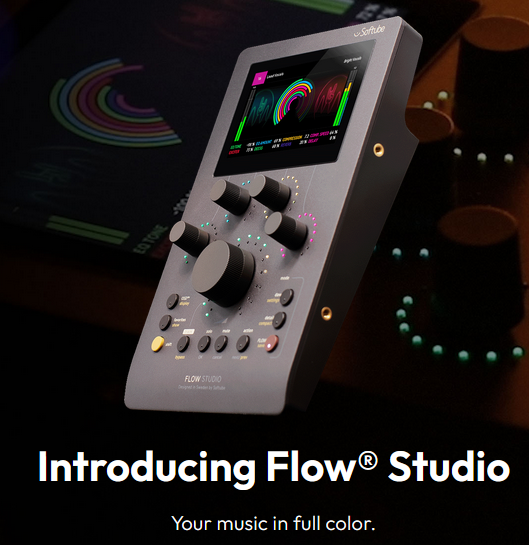
https://www.softube.com/us/hardware/flow-studio
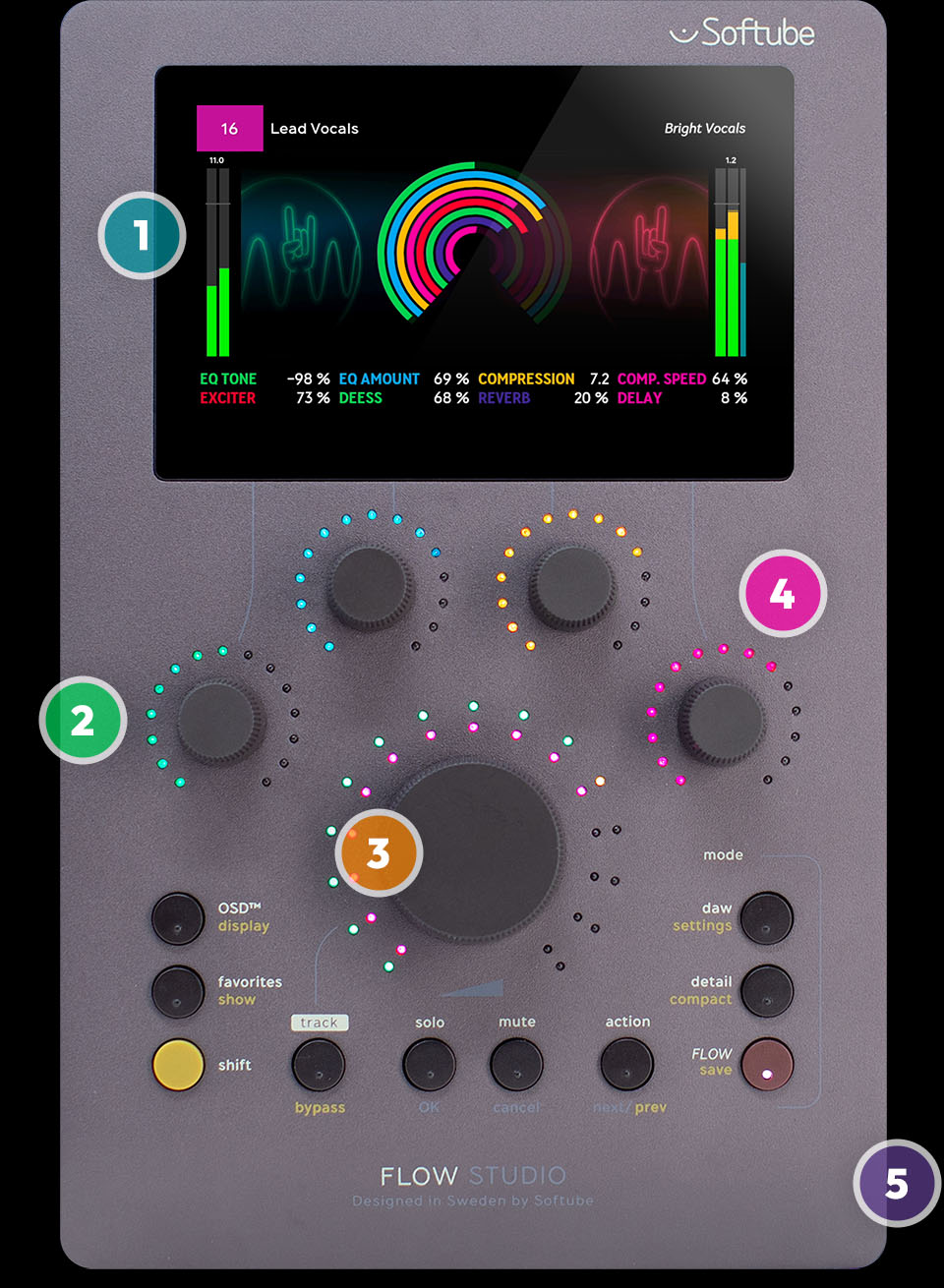
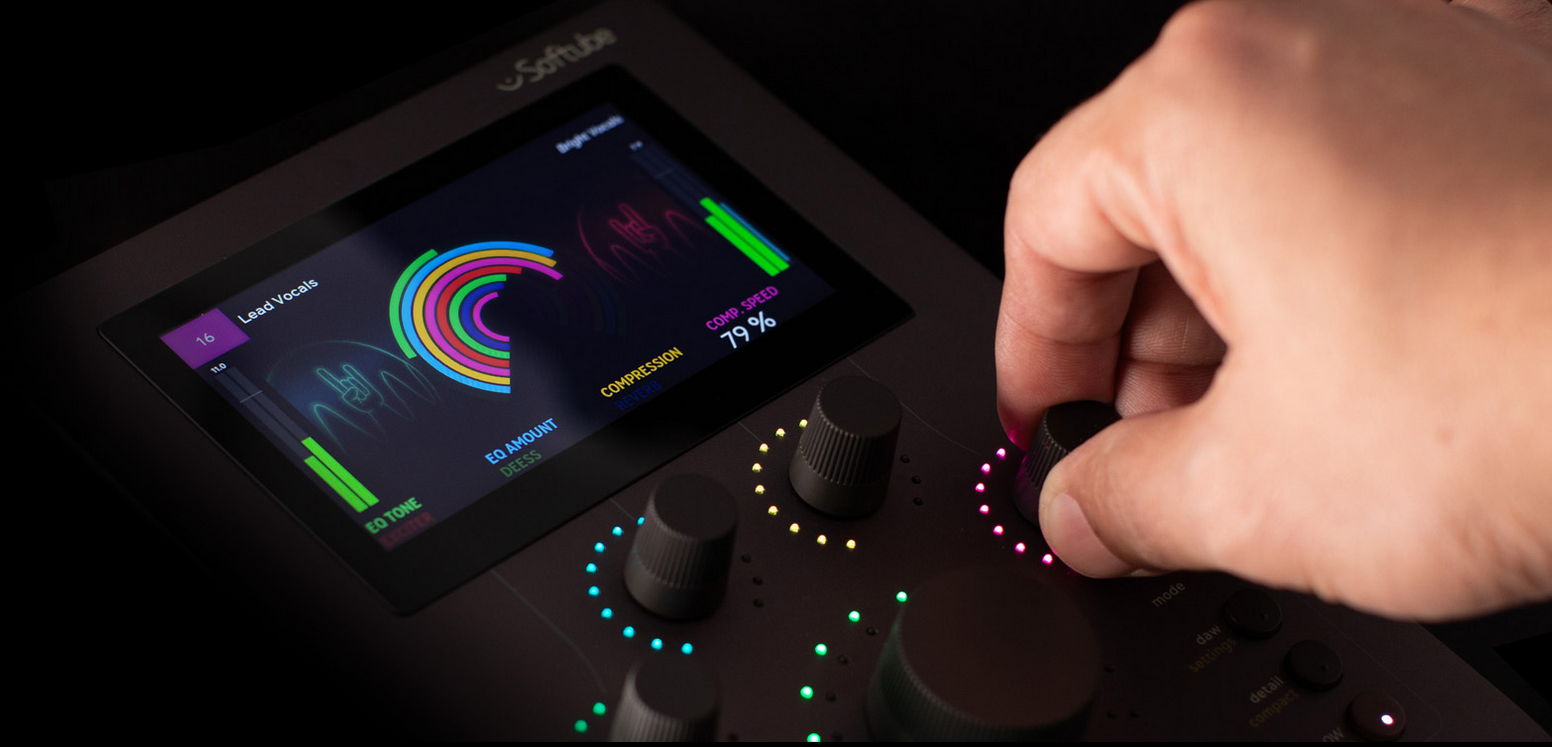
1 - Immersive 4.3-inch high-resolution display
From metering to EQ curves to inspiring graphics and visualizations that keep you focused on your music.
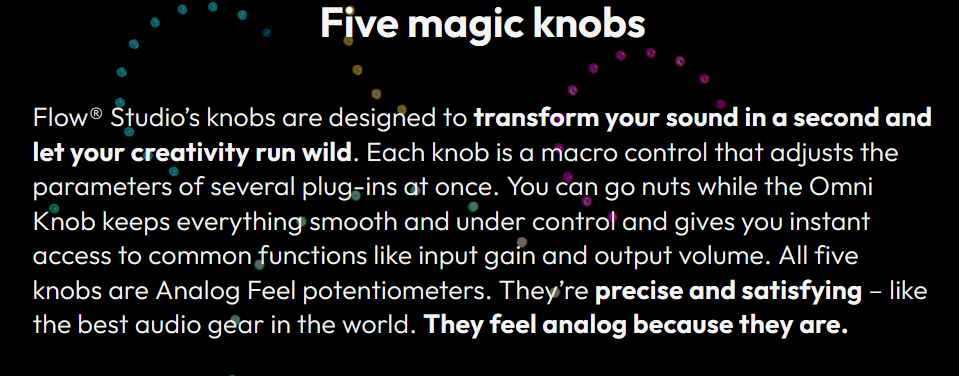
2 - Touch-sensitive Analog Feel knobs
They feel analog because they are. Control effects & more with a high-end, pro audio gear feel.
3 - Omni Knob
The big knob at the heart of the unit has two main uses: scrolling through lists and affecting sound & volume.
4 - Contextual multicolored LED lights
Bright RGB LEDs that change color with the screen view to ensure you always know exactly what you’re controlling.
5 - Premium build
Robust anodized aluminum casing for high-end gear feel.
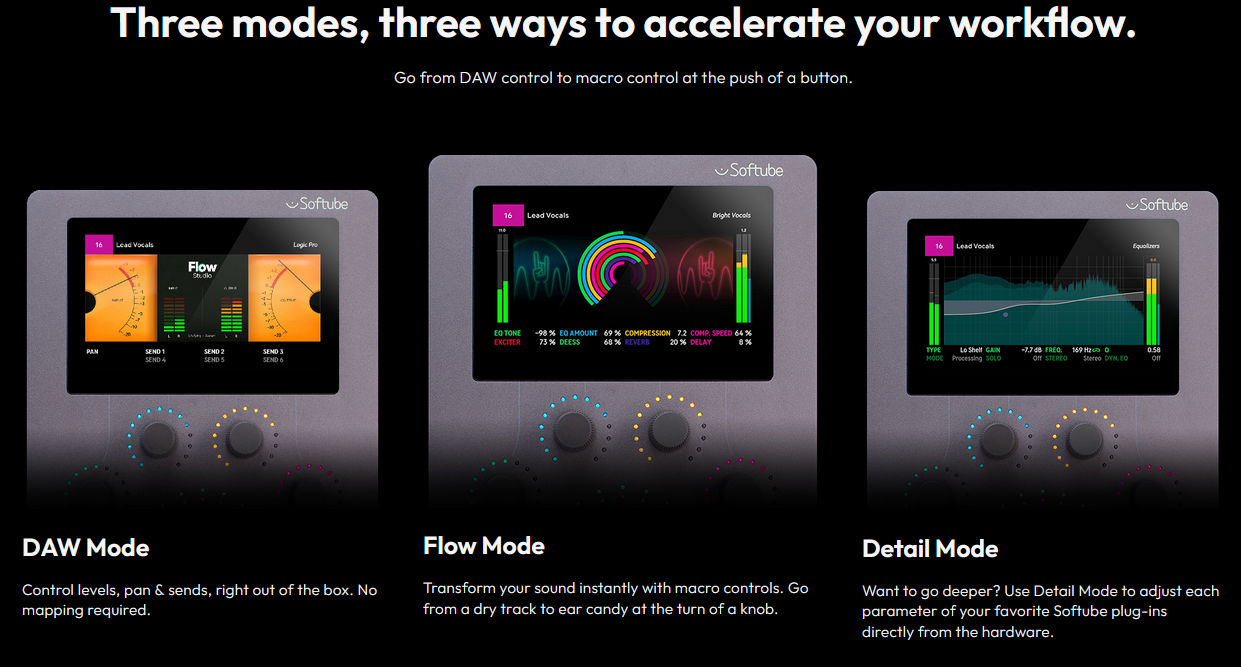
https://www.softube.com/us/hardware/flow-studio
1 - Immersive 4.3-inch high-resolution display
From metering to EQ curves to inspiring graphics and visualizations that keep you focused on your music.
2 - Touch-sensitive Analog Feel knobs
They feel analog because they are. Control effects & more with a high-end, pro audio gear feel.
3 - Omni Knob
The big knob at the heart of the unit has two main uses: scrolling through lists and affecting sound & volume.
4 - Contextual multicolored LED lights
Bright RGB LEDs that change color with the screen view to ensure you always know exactly what you’re controlling.
5 - Premium build
Robust anodized aluminum casing for high-end gear feel.
Release Notes for version 2.6.34 (Released on April 15th, 2026)
New hardware products:- Flow Studio (Includes Flow Studio Suite software bundle)
- Single Unit Stand (compatible with Console 1 Channel Mk III, Console 1 Fader Mk III, and Flow Studio)
- Stereo Delay
- Core Dimensions
- Added Copy/Paste to Plug-in Preset Browser. This feature makes it possible to copy the state of a plug-in to another instance of the same plug-in. This works for instances running inside Flow Mixing Suite and Flow Mastering Suite as well.
- Copy individual sections works again.
- Changed name to Softube On-Screen-Display.
- New algorithm: Chamber. This is an algorithmic and ideal realization of a Chamber reverb. See the user manual for more information.
- Fixed an issue that could cause a crash in Digital Performer when using the software renderer.
- Added EQ curves support in Pro Tools.
- Added advanced Flow Control designer view. This is activated via the plug-in's settings menu. Note: The Flow Control designer view is currently in beta.
- Improved warnings when it comes to mixed builds, missing licenses, and missing installers.
- Fixed a case where it was possible to create an invalid signal chain.
- Fixed so DAW tempo sync works for Bus Processor when running it in Flow Mastering Suite.
- Added Core Dimension and Stereo Delay to the subscription.
- Added all Flows that are included with Flow Studio.
- Fixed an issue causing reported latency to be incorrect when rendering in Wavelab.
Updated: 15 April 2026

Release Notes for version 2.6.35 (Released on April 27th, 2026)
Equalizers, Flow Mastering Suite, Flow Mixing Suite:
- Fixed an issue that could cause keyboard input to be kept by the plug-in after the "add plug-in" menu was closed (the Load Vintage Equalizer menu in the Equalizers case). This would for instance hinder spacebar to be used for transport start/stop in the DAW until the plug-in window was refocused (either by clicking on it or by closing it and opening it again).
Console 1 System:
- Fixed compatibility with Plugin Alliance plug-ins that broke after their 2026 March update.
- Improved compatibility with FabFilter Pro-Q 4 "Instance List" feature which allows multi plug-in control.
Flow Studio:
- Fixed an issue that could cause the hardware to crash if large amount of MIDI data was sent at start-up, for instance via Console 1 Fader.
- Fixed an issue that caused the "Register your unit" dialogue in the On-Screen Display to open the wrong "get started with your unit" web page.
Console 1 On-Screen-Display:
- Fixed an issue that could cause the connection to the On-Screen Display to be lost when restarting a project in Pro Tools.
- Fixed an issue that could hinder the Softube On-Screen Display from ending up in the startup/login items on Mac after updating the application to the new name. This would in turn mean that an application with the old name (Console 1 On-Screen Display) was erroneously started even though it should have been removed in its entirety.
Updated: 27 April 2026
Equalizers, Flow Mastering Suite, Flow Mixing Suite:
- Fixed an issue that could cause keyboard input to be kept by the plug-in after the "add plug-in" menu was closed (the Load Vintage Equalizer menu in the Equalizers case). This would for instance hinder spacebar to be used for transport start/stop in the DAW until the plug-in window was refocused (either by clicking on it or by closing it and opening it again).
Console 1 System:
- Fixed compatibility with Plugin Alliance plug-ins that broke after their 2026 March update.
- Improved compatibility with FabFilter Pro-Q 4 "Instance List" feature which allows multi plug-in control.
Flow Studio:
- Fixed an issue that could cause the hardware to crash if large amount of MIDI data was sent at start-up, for instance via Console 1 Fader.
- Fixed an issue that caused the "Register your unit" dialogue in the On-Screen Display to open the wrong "get started with your unit" web page.
Console 1 On-Screen-Display:
- Fixed an issue that could cause the connection to the On-Screen Display to be lost when restarting a project in Pro Tools.
- Fixed an issue that could hinder the Softube On-Screen Display from ending up in the startup/login items on Mac after updating the application to the new name. This would in turn mean that an application with the old name (Console 1 On-Screen Display) was erroneously started even though it should have been removed in its entirety.
Updated: 27 April 2026


Преогромнейшее спасибо!

Да, к сожалению это так. С плагин альянсом была похожая история, обновил манагера и он стал грузить обновления, хотя на сам сайт нет доступа.Значит и подключиться не надут...
Release Notes for version 2.6.37 (Released on May 27th, 2026)
New product:
Bus Processor 670
Updated: 27 May 2026
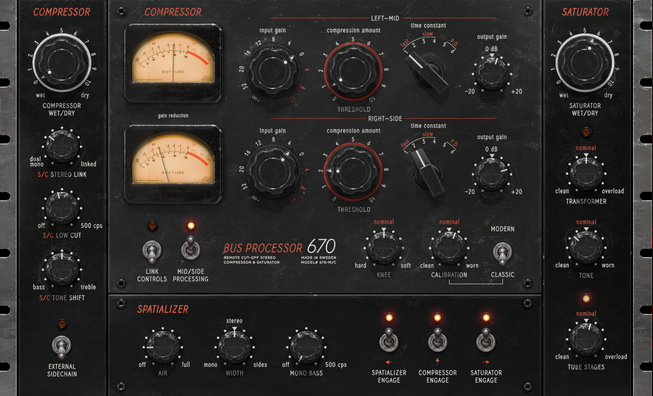
- Our modern take on the legendary dual-channel variable-mu tube compressor
- The distinctive weight, warmth, and authority of the original for any and every bus
- Use it as a native plug-in or in Flow® Studio & Console 1 Mixing System
This plug-in is the product of our quest to discover where the magic of the mythological 670 hardware lies – and distil it. Modern, musical, and that special kind of magical, Bus Processor 670 delivers the unmistakable weight and warmth of the original. Plus, added saturation control, spatialization, and sidechain features for a flexible, modern workflow.
Finally, this rare, sought-after, and expensive dual-channel variable-mu tube compressor has transcended its original form so it can transform your mix or master. Simsalabim.
Full-featured but dead-simple to use, Bus Processor 670 lets you find the magical sound of the 670 for yourself, with a workflow fit for your modern studio.
- The essence of the legendary 670, distilled and made modern
- Unmistakably weighty and warm – just like the original hardware
- Added modern features, like saturation controls and spatialization features
- Enhanced workflow for modern engineering and production processes
- Console 1-ready: compatible with our mixing system hardware
- Flow® Studio-ready: compatible with our Flow Studio hardware
- Included in Flow® Mixing, Mastering & Complete Suite subscriptions
Manual https://www.softube.com/us/user-manuals/bus-processor-670
Про дисторшн
New product:
Bus Processor 670
Updated: 27 May 2026
- Our modern take on the legendary dual-channel variable-mu tube compressor
- The distinctive weight, warmth, and authority of the original for any and every bus
- Use it as a native plug-in or in Flow® Studio & Console 1 Mixing System
This plug-in is the product of our quest to discover where the magic of the mythological 670 hardware lies – and distil it. Modern, musical, and that special kind of magical, Bus Processor 670 delivers the unmistakable weight and warmth of the original. Plus, added saturation control, spatialization, and sidechain features for a flexible, modern workflow.
Finally, this rare, sought-after, and expensive dual-channel variable-mu tube compressor has transcended its original form so it can transform your mix or master. Simsalabim.
Magic Bus
Pricey and prized, fewer than a thousand 670s were ever made, and it was originally used as a mastering limiter for vinyl. With a characteristic vibe heard from Motown to Abbey Road, the unit is known for adding sound and harmonic distortion even when you don’t do a thing. If you push it, it gives pump but – at its more subtle settings – the 670 is great for gluing things together in a warm, musical way. You can see why it’s useful on everything from the mix bus to drums, vocals, and electric guitars, and has earned its place in top studios worldwide.What’s cool about variable-mu?
Variable-mu compression uses tubes to alter gain, and the compression ratio changes dynamically in response to the signal level. The result is the harmonically rich and musical compression that has made the original 670 legendary. This style of vintage processing is great for gluing things together with analog warmth and cohesion, making it ideal for mastering as well as mixing.New Magic
To create our Bus Processor 670 plug-in, we took the finest elements of the original and added our own wouldn’t-it-be-cool-if ideas to make a totally unique tone machine. Starting with full control of saturation points with dedicated knobs for tube and transformer saturation, and a calibration knob to influence the unique compression-dependent saturation of the variable-mu architecture. We also included sidechain options that give you control over filters, tone shift and mono/stereo linking, as well as separate outputs for M/S channels. Then there are the new spatialization features that include air band, mono maker, and stereo widening knob.Full-featured but dead-simple to use, Bus Processor 670 lets you find the magical sound of the 670 for yourself, with a workflow fit for your modern studio.
In short
- A dual-channel variable-mu tube compressor- The essence of the legendary 670, distilled and made modern
- Unmistakably weighty and warm – just like the original hardware
- Added modern features, like saturation controls and spatialization features
- Enhanced workflow for modern engineering and production processes
- Console 1-ready: compatible with our mixing system hardware
- Flow® Studio-ready: compatible with our Flow Studio hardware
- Included in Flow® Mixing, Mastering & Complete Suite subscriptions
Manual https://www.softube.com/us/user-manuals/bus-processor-670
Про дисторшн
A Note On Distortion
In this type of compressor, there are a lot of things that can (and will) distort. We have tried to separate the main types of distortion into three different types:- Cross-over distortion from the push-pull stages in the variable-mu design. This distortion depends on the amount of gain reduction and can be controlled with the Calibration control. It can be eliminated by switching Comp Mode to Modern.
- Transformer distortion. This distortion happens mainly at bass frequencies and is usually very subtle, but we added the possibility to exaggerate it using the Transformer knob.
- Tube saturation. There are tubes throughout this design, and not all tube saturation leads to a "distorted sound"; some saturation can, for example, simply limit the maximum amount of gain reduction the compressor has. The Tube Stages knob controls the audible saturation—the distortion. From subtle to... a lot.
Очень жирный апдейт
Release Notes for version 2.6.38 (Released on June 10th, 2026)
New products:
Amp Room, Flow Mastering Suite, and Flow Mixing Suite
Amplifiers, Blaze Work Amplification, Custom 100W, Pacific Dual Tremolo 100W Black:
Updated: 11 June 2026
Release Notes for version 2.6.38 (Released on June 10th, 2026)
New products:
- American Mainstayer
- Bass Standard Line V8
- Lion Head Vibrato
- Pacific Dual Tremolo 100W Silver
- Tinnerö Tremolo
- Top Boost
- TUBE Overdrive
- Added Direct DAW Control support for Ableton Live. Add "Softube Direct DAW Control" under Tempo/Midi/Control Surfaces in settings to activate it. We recommend using Ableton Live 12.4 or newer.
- Added the possibility to insert a plug-in (Console 1 or Flow Mixing Suite) on a track directly from the hardware in Cubase and Nuendo with Direct DAW Control active. On Console 1 Channel Mk III, this is done by pushing the "Load Strip/Section" button, and on Flow Studio by pushing the "Flow" button. This feature is also available in Ableton Live, Bitwig, and Reaper.
- Added support for controlling Channel Strip modules in Cubase on Limited Tracks with Direct DAW Control active. This works for Filters, Compressor, and EQ.
- Fixed a MIDI issue that could prevent Console 1 tracks from appearing immediately on project load in Cubase/Nuendo with Direct DAW Control active.
- Added an update to make it possible to use the OK button on a Flow Studio unit when navigating a Console 1 menu.
- Optimized how graphical data is sent to the screens on the hardware units.
- Added the possibility to load a single plug-in from the Flow Selector. This is done by switching Type from Flows to Plug-ins in the Flow Selector using Flow Control 3. The plug-ins are loaded with 8 pre-mapped Flow Controls. This feature is only available when Flow Studio is controlling the Flow Mixing Suite plug-in.
- Added new visualizations: Goniometer, Distortion, and Guitar Tuner.
- Filter options are now removed from the Flow Selector when the result would be empty (e.g., hiding the Mastering filter if there are no Mastering Flows available).
- Fixed an issue that could cause the screen to turn black when a plug-in was placed on an active track.
- Fixed an issue that could cause Flow Studio to crash when large amounts of MIDI data were sent to the unit.
- Fixed an issue that caused front-page parameters to be off by one when using Flow Mastering Suite in Detail Mode.
- Added Screen Reader support for Flow Studio.
- Fixed an issue that could cause the frequency analyzer to disappear on certain tracks. Switching back and forth to another track would make it appear again.
- Fixed a rare crash that could occur when double-tapping a knob on Console 1 Channel Mk III while using Pro Tools.
- Fixed an issue that could cause the On-Screen Display to keep running after it had been uninstalled on Mac.
- Fixed a bug that could cause license failure pop-up windows to be triggered unexpectedly when loading the plug-in.
Amp Room, Flow Mastering Suite, and Flow Mixing Suite
- Added automation support for the On/Off parameters of the individual modules.
Amplifiers, Blaze Work Amplification, Custom 100W, Pacific Dual Tremolo 100W Black:
- Added a Guitar Tuner to the UI, available in the plug-in menu bar.
- Added LoadIR as a cabinet option.
- Fixed an issue that prevented "Ext. S/C to..." and "Filters to..." from working when using the processor inside Console 1.
- Added Tape/Preamp Headroom parameter. The new parameter is adjusted via `Shift + Input Gain` (Console 1 Channel Mk III units only, since `Shift + Input Gain` is used to control Width on Mk I/II units) or via the plug-in UI.
- Fixed an issue where the manual button inside the Console 1 plug-in would incorrectly redirect to the older Mk II hardware manual.
- Added an option to hide unavailable Flows from the Flow Selector.
- Added new Alex Venguer Flow Pack by Alex Venguer.
- Added a Guitar Tuner to the UI, available in the plug-in menu bar.
- Fixed a bug that could cause some cabinets to erroneously show up as "not installed".
- Fixed a potential parameter synchronization issue that could occur if both the Flow Mixing Suite and Console 1 were placed on the same track.
- New Flow: Vintage Master. This Flow includes the Bus Processor 670.
- Fixed an issue that could cause plug-in descriptions to linger after clearing the signal chain (either by pressing "Empty Signal Chain" in the Plug-in Preset Browser or "New" in the Flow Selector).
- Fixed an issue in our pitch detection algorithm that could cause rare, seemingly random crashes. This update also improves overall pitch tracking stability.
Updated: 11 June 2026

Камрады, кто юзает Console 1. Добавление линейки Brainworx касается всех версий консолей, включая MK2?
Раздумываю, не прикупить ли контроллер. Много лет назад работал в студии и у меня никак не получалось заставить себя пользоваться Mackie, хотя пытался неоднократно. В итоге он просто пылился. Про Console 1 множество восторженных отзывов, что мол - прям реальные аналоговые очучения)). У меня вопрос к юзерам. Он у вас постоянно в работе, или со временем таки превратился в пылесборник? Кто-то сталкивался с болезненным сломом привычек, при внедрении его в свой процесс работы? Или наоборот, быстро отвыкаешь от разнокалиберных плагинов в инсертах и сея железка становится незаменимой?
Раздумываю, не прикупить ли контроллер. Много лет назад работал в студии и у меня никак не получалось заставить себя пользоваться Mackie, хотя пытался неоднократно. В итоге он просто пылился. Про Console 1 множество восторженных отзывов, что мол - прям реальные аналоговые очучения)). У меня вопрос к юзерам. Он у вас постоянно в работе, или со временем таки превратился в пылесборник? Кто-то сталкивался с болезненным сломом привычек, при внедрении его в свой процесс работы? Или наоборот, быстро отвыкаешь от разнокалиберных плагинов в инсертах и сея железка становится незаменимой?

@soundroad, у меня mk II и Brainworx и UAD плагины работают в ней. Но! При загрузке уадовских ченел стрипов (и других плагинов) в консоль- загрузка процессора возрастает, по сравнению с тем-же плагином, но в оригинальной "упаковке". Где-то попадалась инфа, что это из-за неотключаемого оверсэмплинга.
Касаемо воркфлоу- ну вот мне не хватает отображения режимов компрессора например. На глаз крутить Ratio например, ну такое себе.
В целом, "супераналоговых ощущений" нет, нормальная эмуляция. Работая эквалайзером, меньше смотришь- больше слушаешь. Это прикольно)
Касаемо воркфлоу- ну вот мне не хватает отображения режимов компрессора например. На глаз крутить Ratio например, ну такое себе.
В целом, "супераналоговых ощущений" нет, нормальная эмуляция. Работая эквалайзером, меньше смотришь- больше слушаешь. Это прикольно)
Да, привычка "смотреть на звук" - это бич современного миксинга)).Работая эквалайзером, меньше смотришь- больше слушаешь. Это прикольно)
Я правильно понимаю, что все сторонние плагины адаптируются не нарушая общую логику консоли? Т.е. неважно какой плагин загружен, полосы ЭКю, параметры компрессора и прочее, всегда находится в одних и тех же местах? Мне кажется, что это самый главный плюс консоли - мышечная память. которая в итоге ускоряет процесс.
Я одновременно думаю и о каком-то универсальном контроллере, типа Nektar Panorama CS12. С него можно управлять чем угодно, но не поедет ли мозг от того, что параметры будут постоянно плавать по разным энкодерам...
Все адаптируется под формат консоли. И поэтому не все параметры сторонних плагинов могут быть доступны для контроля. Но самые важные- все доступны (что-то через шифт)
Но выбирая между Mk II и Mk III сейчас, я бы однозначно взял бы третий. Его миниэкранчики- то что не хватает второму. И также сравнивая фейдер Mk II и Mk III, у третьего все надписи каналов перед глазами, не глядя на монитор, ничего не перепутаешь.
Последнее редактирование:
Чет загрузил триал всего софтюбовского софта (Flow Suite) и некоторые плагины меня прям расстроили дикой жручестью. У меня достаточно старый пакет Volume 2 + еще несколько отдельно купленных плагинов.
Старый FET компрессор кушает 2% CPU, а MK2 13% и это на буфере 1024! Нихрена себе они постарались.
@SoundExplosion, а Вы плаги от Brainworx юзаете в Console 1? Они тоже в оболочке Softube жрут ощутимо больше, чем сами по себе?
Старый FET компрессор кушает 2% CPU, а MK2 13%
и это на буфере 1024! Нихрена себе они постарались.@SoundExplosion, а Вы плаги от Brainworx юзаете в Console 1? Они тоже в оболочке Softube жрут ощутимо больше, чем сами по себе?
@soundroad, а ssl uc 1 не интереснее выглядит как контроль для плагинов? Один его аналоговый vu чего стоит! 
Однажды запускал, но не обратил внимание как они грузят. А в данный момент ничего от них нет.Вы плаги от Brainworx юзаете в Console 1
Рановато конечно делать выводы, но пока что концепция Flow мне не понятна.
1,Очевидно, что надо привыкнуть ко всем разномастным мордам разных плагинов, между которыми скачешь, иначе происходит полная дезориентация.
2,По сути - это просто пресеты из набора плагинов, как, например в микшере от Слейта. Но если у Слейта морды плагинов стандартизированы, то тут полный зоопарк диковинных зверушек. Я не уверен, что кому-то по силам свыкнуться с интерфейсами всех этих плагов за 14 дней триала.
3,Редакция этих Flows, насколько я понял, пока ограничена. Не смог найти как добавить плагин в готовый flow. ИИ пишет, что это работает только для цепочек созданных юзером. Как-то это все странно...
4, Почти все flows люто грузят проц 20+%. У меня i7 8700K не топ конечно. Но в проекте, который я только что свел, на некоторых каналах по 5-6 плагинов и они суммарно грузят проц меньше, чем один Flow.
Вопчем, опять задумался... может все таки Nektar CS12? Помимо открытой архитектуры, еще и интеграция со Studio One.
1,Очевидно, что надо привыкнуть ко всем разномастным мордам разных плагинов, между которыми скачешь, иначе происходит полная дезориентация.
2,По сути - это просто пресеты из набора плагинов, как, например в микшере от Слейта. Но если у Слейта морды плагинов стандартизированы, то тут полный зоопарк диковинных зверушек. Я не уверен, что кому-то по силам свыкнуться с интерфейсами всех этих плагов за 14 дней триала.
3,Редакция этих Flows, насколько я понял, пока ограничена. Не смог найти как добавить плагин в готовый flow. ИИ пишет, что это работает только для цепочек созданных юзером. Как-то это все странно...
4, Почти все flows люто грузят проц 20+%. У меня i7 8700K не топ конечно. Но в проекте, который я только что свел, на некоторых каналах по 5-6 плагинов и они суммарно грузят проц меньше, чем один Flow.
Вопчем, опять задумался... может все таки Nektar CS12? Помимо открытой архитектуры, еще и интеграция со Studio One.
Сейчас просматривают
Всего: 1 (пользователей: 0, гостей: 1)